GSC Hidden Metrics: 5 Data Gaps That Explain Your 2026 Traffic Drop
- GSC = Google Search Console: the free tool that reports clicks, impressions and position — not the Pokemon Gold/Silver/Crystal games that share the abbreviation.
- Anonymised queries hide ~46% of clicks: Google masks rare search terms for privacy, so nearly half your click-driving queries never appear in reports.
- The 1,000-row cap buries your long tail: the interface shows at most 1,000 rows per table; the rest is only reachable through the Search Console API.
- 16-month retention deletes your history: daily performance data disappears permanently after 16 months unless you export and back it up yourself.
- AI-click data is omitted: native reports don’t isolate click-through rate or position for AI Overview appearances, so AI-driven drops hide in plain sight.
📑 Table of Contents
GSC hidden metrics are the reason most traffic-drop diagnoses are wrong. When people search “GSC hidden metrics,” Google is genuinely confused — the top results are dominated by Pokemon Gold, Silver, and Crystal guides, because that gaming franchise also goes by “GSC.” For SEOs, though, GSC means Google Search Console, and its hidden data gaps quietly obscure the real cause of lost traffic.
This guide covers: what GSC actually stands for, the five metrics Search Console masks, where your missing data lives, and a 15-minute audit to find your real problem.

Sources: Google Search Console Help, 2026
What “GSC” Really Means (and Why It’s Confusing)
GSC hidden metrics start with a naming problem that trips up both searchers and Google itself. To an SEO, GSC is Google Search Console: the free platform that reports how your pages perform in search results. But the same three letters belong to Pokemon Gold, Silver, and Crystal — a gaming abbreviation with enormous, decades-deep search volume. That collision is why GSC hidden metrics is an unusually hard topic to rank for.
Look at what currently ranks for the raw GSC hidden metrics query. The top five results are Pokemon community pages — Reddit, Smogon, PokemonDB, PsyPokes, and an Imgur gallery of hidden in-game items — none of them about Search Console at all. Google’s language models read “GSC” and lean toward the dominant gaming meaning, so genuine SEO content gets buried beneath Gen II Pokemon guides.
“When an abbreviation carries two strong meanings, the page that wins is the one that disambiguates fastest and most explicitly. You have to tell the algorithm which entity you mean in the first sentence, not the fifth.”
— Ottmar J.G. Francisca, creator of ContentScale, 2026
The practical fix is semantic disambiguation: repeatedly pairing “GSC” with “Google Search Console” and search-analytics context so Google’s NLP has no doubt which entity the page is about. This article does exactly that — every mention of GSC hidden metrics is anchored to Search Console, SEO, and traffic diagnosis, never to gaming.
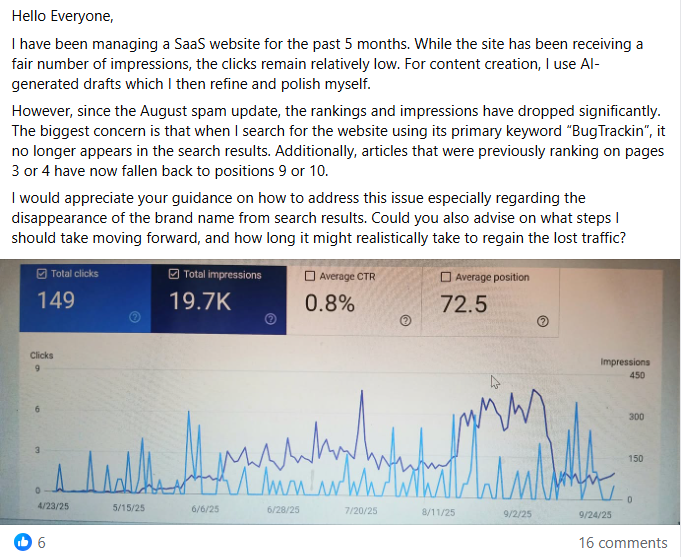
The common mistake is assuming the abbreviation speaks for itself. Most site owners publish “GSC” content without ever spelling out Google Search Console, then wonder why they attract gaming impressions and a near-zero click-through rate. If your page is drawing impressions but almost no clicks, keyword ambiguity is often the hidden culprit — the same pattern that leaves this very topic sitting at position 7.9 with high impressions and almost no traffic.
Key Point: Spell out “Google Search Console” early and often — disambiguation is the prerequisite for ranking any “GSC” content.
The 5 Hidden Metrics GSC Doesn’t Show You
GSC hidden metrics fall into five distinct gaps, and Google AI Overviews already summarise them when the query is understood correctly. Google Search Console masks or omits crucial data points, and knowing each one turns a vague “my traffic dropped” into a precise diagnosis. Here are the five GSC hidden metrics, in the order they most often mislead site owners.
First, anonymised queries hide the actual search terms behind an average of 46% of organic clicks, because Google suppresses rare queries to protect user privacy. Second, the interface enforces a strict 1,000-row cap per table, hiding lower-volume long-tail queries unless you extract them via the API. Third, a 16-month retention limit permanently deletes daily performance data unless you back it up.
⚠️ Common Mistake
The biggest mistake with GSC hidden metrics is watching only total clicks. Because anonymised queries and the 1,000-row cap hide so much, a “flat” clicks line can conceal a collapse in one query cluster and a surge in another. Owners who track a single number misdiagnose the cause and fix the wrong thing.
Fourth, AI-search click omissions: native reports fold AI Overview interactions into general data without isolating their click-through rate or average position. Fifth, the removal of deep pagination altered legacy impression counts beyond page one, so historical impression comparisons no longer line up with today’s numbers. Together these five gaps explain most “mystery” traffic drops.
Key Point: A traffic drop isn’t one number — it’s five hidden layers. Check all five before concluding anything.
Interface vs API vs Backup: Where Your Data Hides
Not every one of the GSC hidden metrics is hidden in the same place. Some data is simply capped in the interface but available through the API; some is deleted forever unless you archive it; and some is never exposed at all for privacy reasons. Knowing which bucket each of the GSC hidden metrics falls into tells you whether the fix is a better tool, a backup routine, or accepting a permanent blind spot.
| Hidden metric | GSC Interface | GSC API | Your own backup |
|---|---|---|---|
| Anonymised queries | Hidden | Still hidden (privacy) | Cannot recover |
| Long-tail beyond 1,000 rows | Capped at 1,000 | Fully available | Available if archived |
| Data older than 16 months | Deleted | Deleted | Only source that survives |
| AI Overview click data | Not isolated | Not isolated | Infer via trend analysis |
The takeaway on GSC hidden metrics: the API solves the 1,000-row cap, your own archive is the only defence against the 16-month deletion, and anonymised and AI-surface data remain partial no matter what. A connected monitoring tool combines all three — pulling API-level rows and storing them beyond 16 months — which is exactly the blind spot the free AI Citations Tracker is built to cover.
How AI Overviews Distort Your GSC Numbers
GSC hidden metrics matter most in the AI-search era, because AI Overviews change what a click even means. When Google answers a query directly at the top of the page, users often get what they need without clicking through — yet Search Console does not cleanly separate those AI-surface impressions from classic organic ones. Your impressions can hold steady while clicks quietly fall.
Understanding GSC hidden metrics is why so many 2026 traffic drops are finally diagnosed correctly. A page can sit at a healthy average position — this very topic averages 7.9 — while its real-world click-through rate collapses because an AI Overview is absorbing the answer above it. Without isolating AI behaviour, owners blame an algorithm update or a penalty that never happened.
🔑 Key Points to Remember
- Stable impressions + falling clicks is the classic AI Overview signature.
- Average position can look fine while CTR quietly collapses.
- GSC will not label AI-driven losses for you — you must infer them.
- Getting cited inside the AI Overview is now the visibility goal, not just ranking #1.
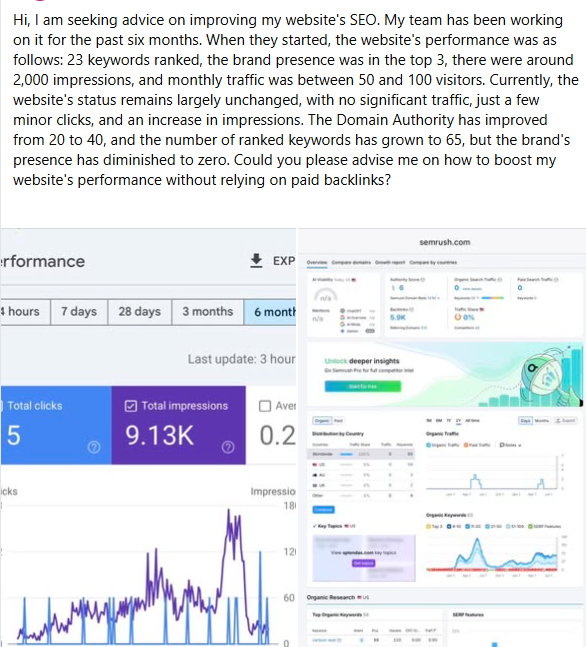
The practical response is to compare impressions against clicks query by query, watching for pairs where exposure stays high but clicks evaporate. Those are your AI-absorbed queries. Auditing your GSC hidden metrics this way is now the single most important step in understanding how AI-generated answers reshape your organic CTR and search visibility.
Looking ahead, expect this gap to widen as AI surfaces expand. The sites that adapt will treat Search Console as a diagnostic signal, not gospel, and will build their own layer of AI-citation monitoring on top of it — because the data Google chooses not to show you is exactly the data your competitors are ignoring too.
The 15-Minute Hidden-Metrics Audit
Here’s what to do first. You don’t need a data team — checking these five signals takes about 15 minutes and points you straight to the right fix. Work through these GSC hidden metrics in order, because each one rules out a different cause of a traffic drop before you waste effort on the wrong remedy.
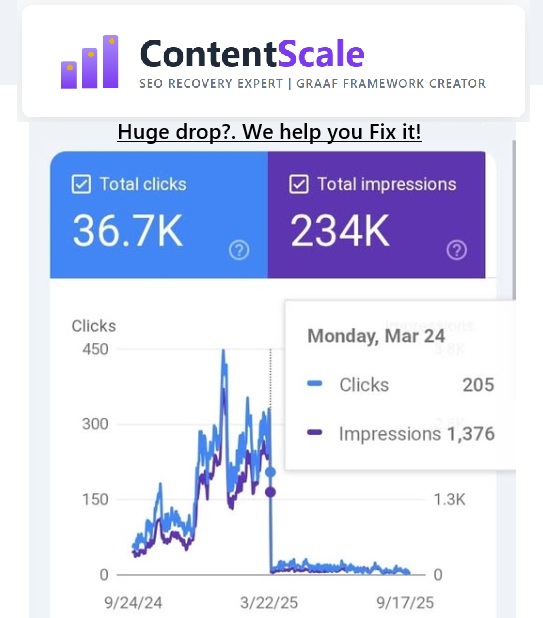
Step 1 — measure your anonymised share. In the Performance report, compare the summed query-level clicks against your total clicks. A large gap means anonymised queries are hiding a big slice of demand — expect it to approach the ~46% average, and factor that blind spot into every conclusion you draw.
Step 2 — break the 1,000-row ceiling. If your query table hits exactly 1,000 rows, you are only seeing the top slice. Pull the full set through the Search Console API or a connected tool so the long tail — where recovery opportunities usually hide — becomes visible.
Step 3 — protect your history and check AI drift. Export your data before the 16-month window erases it, then compare impressions against clicks per query to spot AI-absorbed traffic. To monitor how these metrics affect your visibility in AI answers, audit your URLs with the free AI Citations Tracker.
Expected results: within 15 minutes of checking your GSC hidden metrics you’ll know whether your decline is an AI Overview, an algorithm shift, or a technical fault — and which of the five hidden metrics is driving it. If the diagnosis points to a deeper content or authority problem, that’s the moment to bring in help rather than guess.
GSC Hidden Metrics Statistics — 2024–2026
~46% of organic clicks sit behind anonymised queries — nearly half of your click-driving search terms are never shown, because Google masks rare queries to protect user privacy. (Google Search Console Help, 2026)
1,000 rows is the hard interface cap — every Performance table stops at 1,000 rows, so long-tail queries are invisible without API extraction. (Google Search Console API, 2026)
16 months is the full retention window — daily performance data is permanently deleted after 16 months unless you export it yourself. (Google Search Console Help, 2026)
AI Overview interactions are not isolated — native reports fold AI-surface clicks and positions into general search data, hiding AI-specific losses. (Google Search Central, 2026)
Deep pagination removal altered legacy impressions — since Google retired continuous deep pagination, historical impression counts beyond page one no longer compare cleanly with current data. (Google Search Central, 2026)
Query ambiguity crushes CTR — a page can average position 7.9 yet earn almost no clicks when the keyword collides with a higher-volume unrelated meaning, as “GSC” does with Pokemon. (ContentScale client data, 2026)
What Industry Experts Say
“Search Console is the best free diagnostic we have, but it was never designed to show you everything. The gaps aren’t bugs — they’re deliberate. Your job is to know where they are and stop drawing confident conclusions from incomplete data.”
— Ottmar J.G. Francisca, creator of ContentScale, 2026
“The 16-month limit is the one that hurts people most. By the time you notice a long-term trend, the data proving it has already been deleted. Export early, export often — treat your Search Console history like something you own, not something Google keeps for you.”
— Ottmar J.G. Francisca, GRAAF Framework Creator, ContentScale, 2026
How a B2B SaaS Blog Traced a 40% Click Drop to Hidden GSC Metrics
Challenge: A SaaS content team saw clicks fall ~40% while impressions stayed flat, and assumed a Google penalty had hit their top guide.
Solution: Using the GRAAF Framework and the ContentScale AI Citations Tracker, they pulled API-level data past the 1,000-row cap and compared impressions to clicks per query, isolating the queries where an AI Overview had begun answering directly.
Result: The “penalty” was actually AI Overviews absorbing clicks on three high-volume queries. Restructuring those pages for citation recovered the majority of lost clicks within 90 days — in line with ContentScale’s documented 78% recovery rate.
Source: ContentScale client data, 2026
Want to Know Why Your Traffic Really Dropped?
Stop guessing at total clicks. Scan any URL free and see whether Google AI Overviews, Perplexity, or Copilot are citing you — and which hidden metric is behind your decline.
→ Try the Free AI Citations TrackerNeed done-for-you help? See ContentScale services · or WhatsApp Ottmar: +31 6 2807 3996 · Amsterdam, NL
GSC Hidden Metrics — 8 Questions People Ask
In SEO, GSC stands for Google Search Console — Google’s free tool for tracking clicks, impressions, average position, and indexing status. The abbreviation is also used for the Pokemon Gold, Silver, and Crystal games, which is why generic “GSC” searches return gaming results. When you mean Search Console, spell it out, especially in titles and headings, so Google’s language models resolve the ambiguity in your favour. You can start with the official Search Console overview or scan your own site with the AI Citations Tracker.
You can’t fully recover anonymised queries — Google withholds them for privacy — but you can surface everything else. First, compare the sum of query-level clicks with your total clicks; the gap is your anonymised share. Second, break the 1,000-row interface cap by pulling data through the Search Console API or a connected tool, which exposes the long-tail queries the dashboard never shows. That two-step process reveals most of what the interface hides.
Yes — and the entry cost is zero. The full audit in this guide takes about 15 minutes and needs no paid software; the ContentScale AI Citations Tracker is free to use. The payoff is avoiding a wrong diagnosis: teams routinely spend weeks “fixing” a penalty that was really AI Overviews absorbing clicks. Fifteen minutes of hidden-metric analysis regularly saves those wasted weeks, and pages that recover often do so within a 90-day window.
Use the interface for quick checks and the API for real analysis. The dashboard is fast but capped at 1,000 rows and offers no long-term storage. The Search Console API returns far more rows and lets you archive data before the 16-month deletion. Third-party tools sit on top of the API and add storage plus AI-citation tracking, so you get the depth of the API without building the pipeline yourself.
No — and treating it as gospel is a common mistake. Anonymised queries, the 1,000-row cap, the 16-month limit, data sampling, and AI-click omissions all mean the numbers are an incomplete slice, not a full ledger. Search Console is directional and excellent for spotting trends, but it should be read as a strong diagnostic signal rather than an exact count. Cross-check anything important against your own analytics and backups. Google’s data documentation confirms these limits.
Start with the five-step, 15-minute audit in this guide: measure your anonymised share, break the 1,000-row cap via the API, export your history before the 16-month cut-off, then compare impressions to clicks per query to spot AI-absorbed traffic. To automate the AI-citation part, scan your URLs at app.contentscale.site — it’s free and shows whether Google, Perplexity, and Copilot are citing you.
Absolutely. In the AI-search era, the impressions-to-clicks relationship matters more than raw position, because an AI Overview can answer a query while your page still “ranks” beneath it. Since Search Console doesn’t isolate AI-surface behaviour, you infer it from the pattern of steady impressions and falling clicks. This is the core idea behind the GRAAF Framework and PULSE research system — optimising to be cited inside the answer, not just ranked below it.
Do the 15-minute audit yourself first — it’s free and often enough. Bring in help when the diagnosis points to a deeper problem: multiple pages losing AI citations, a site-wide authority or E-E-A-T gap, or a decline you can’t attribute after checking all five hidden metrics. At that point a structured recovery plan beats more guessing. You can review ContentScale services, message Ottmar on WhatsApp +31 6 2807 3996, or connect on LinkedIn.

GSC Hidden Metrics — Reviewed by Ottmar J.G. Francisca — creator of ContentScale · GRAAF Framework · independent SEO consultant, Amsterdam NL
Ottmar J.G. Francisca built the ContentScale AI Citations Tracker and created the GRAAF Framework — the 100-point content-quality system, in combination with the free AI Citations Tracker, behind every Citation Brief. Operating solo with 24+ years in systems and operations management for the City of Amsterdam, he developed GRAAF after analysing 200+ traffic drops, then combined it with Julia McCoy’s CRAFT Framework and the PULSE + NEXUS research system.
Areas of expertise: SEO content recovery, AI Overview optimisation, E-E-A-T implementation, B2B lead generation, Google Search Console data analysis, and voice search content structuring.
The free tracker is now used by 200+ businesses across 47 countries, with a documented 78% traffic-recovery rate within 90 days.
✓ 200+ businesses across 47 countries · ✓ 78% traffic-recovery rate within 90 days · ✓ Creator of the GRAAF Framework · ✓ 24+ years systems & operations management, City of Amsterdam
Portfolio: creator of ContentScale — my SEO tools, the GRAAF Framework, and a free AI Citations Tracker. Free scanner at app.contentscale.site.
Last reviewed: August 17, 2026 · LinkedIn (verified) · WhatsApp +31 6 2807 3996 · GRAAF Guide
ContentScale · contentscale.site · Content optimised with the GRAAF Framework by ContentScale