How to Measure Your AI Visibility in Google Search
Google finally reports how often your pages appear inside AI Overviews and AI Mode. Here is how to find that data, read it correctly, and act on what it shows.
AI visibility in Google Search measures how frequently your website is cited, mentioned, and linked within Google’s generative features like AI Overviews and AI Mode. You can measure it directly in Google Search Console’s generative AI performance reports, which track impressions, pages, countries, and devices for those AI surfaces.
Quick Facts
- Official report name
- Search Generative AI performance reports
- Google AI surfaces
- AI Overviews, AI Mode, and Discover generative features
- Core retrieval tech
- Retrieval-Augmented Generation (RAG)
- Data begins
- May 18, 2026 (no historical backfill)
- Metric available today
- Impressions (clicks and query data not yet included)
What this guide covers
What Is AI Visibility in Google Search?
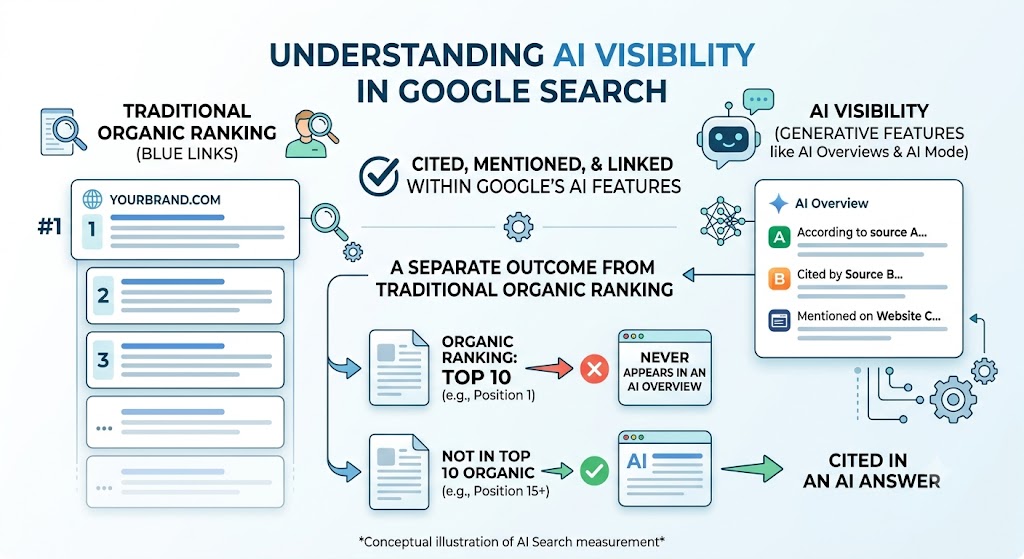
AI visibility in Google Search measures whether your brand or website is cited, mentioned, and linked within Google’s generative features like AI Overviews and AI Mode. It is a separate outcome from traditional organic ranking. A page can rank on the first page of blue links and still never appear in an AI Overview, and a page can be cited in an AI answer without ranking in the top ten at all.
The distinction matters because the two channels are now measured separately. AI Overviews are the AI-generated summaries that sit above the organic results on a standard search page, pulling from several sources and linking out to a handful of them. AI Mode is Google’s fully conversational experience, where the entire results page is an AI answer built from multiple pages. Both can name your site, and both are worth winning — but neither shows up in your old ranking reports.
For two years this was a blind spot. SEOs could see that click-through rates were falling and that AI answers were expanding, but Google offered no official data on whether a given site was actually inside those answers. That changed in June 2026, which is what makes measurement — not guesswork — finally possible.
How to Access the Google Search Console Generative AI Report
On June 3, 2026, Google launched dedicated generative AI performance reports inside Google Search Console. As the official Search Central announcement explains, they report impressions for URLs that appeared in generative AI features such as AI Overviews and AI Mode, plus generative features in Discover, broken down by page, country, device, and date. The data history begins on May 18, 2026 — there is no backfill for anything earlier, so every account starts its AI-visibility baseline from that point forward.
To find it, open the Performance section, where a dedicated Generative AI view now sits alongside the standard Search results report. Apply the Generative AI search-appearance filter and the view strips back to the impressions your URLs earned specifically inside AI features. One point trips people up: these impressions were already counted in your overall Performance report. What is new is the dedicated view that isolates them, not the underlying data — so your aggregate totals do not change when the report appears.
Don’t see the report yet? You are not doing anything wrong. Google is releasing it in stages — it began with a subset of sites and has been widening access since June 23, 2026. Availability also depends on where your AI features have launched: AI Overviews and AI Mode go live region by region, so a US-focused site and an EU-focused site can be on very different timelines. If the filter is missing, skip ahead to the playbook and check back weekly.
Key Metrics for Measuring AI Search Visibility
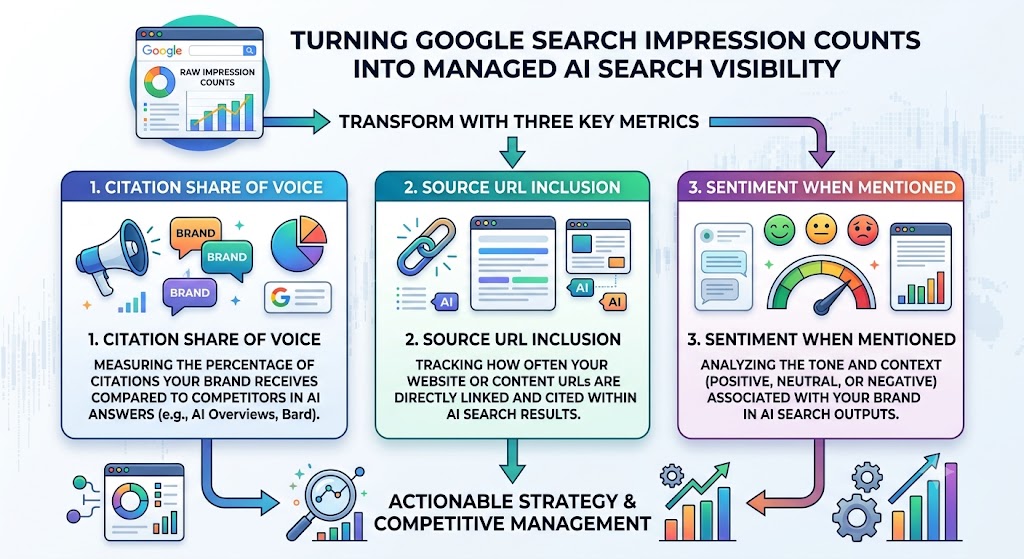
The three metrics that define AI search visibility are citation share of voice, source URL inclusion, and sentiment when your brand is mentioned. Google’s native report gives you the raw impression counts; these three turn those counts into something you can actually manage against competitors.
- Citation share of voice. How often you are cited versus your competitors for the queries that matter to you. A rising impression count means little in isolation — what tells you whether you are winning is the share of the answer you own relative to everyone else competing for the same citation.
- Source URL inclusion. Which specific pages Google pulls into AI answers. The Pages tab of the generative AI report is exactly this signal for Google’s surfaces: it tells you which content Google already trusts enough to cite, which is where your optimization effort compounds fastest.
- Sentiment. How your brand is described when it is mentioned. Being cited is not automatically good — it matters whether the surrounding summary frames you accurately and favorably. This is the metric Google’s own report cannot show — and as Search Engine Land noted at launch, the report also omits clicks and query data — which is where cross-platform tracking earns its place.
Read together, these three answer the real question. Not “did my impressions go up?” but “am I winning a bigger share of the answers, on the pages I care about, described the way I want?”
How Google’s Generative AI Features Select Sources
Google’s generative AI features rely on Retrieval-Augmented Generation (RAG) to ground their answers: rather than inventing a response, the model retrieves relevant, high-trust pages from the core search index and builds the answer from them. That single fact reframes optimization — you are not writing for a model’s training data, you are competing to be one of the pages it retrieves at answer time.
Two mechanics follow from this. Query fan-out means Google often splits one question into several sub-queries, runs them, and synthesizes the results — so a page that cleanly answers a specific sub-question can be pulled in even when it does not rank for the original broad query. And because retrieval draws from the core search index, your traditional ranking and technical health still matter: a page that is not indexed, or buried, is not a candidate for retrieval in the first place.
The practical takeaway: entity authority and clean, retrievable structure decide selection. Google pulls pages it can confidently identify as being about a known entity, that answer a discrete question directly, and that it already trusts from the core index. Optimizing for AI visibility is therefore not a separate discipline bolted onto SEO — it is SEO aimed at retrieval instead of ranking.
Step-by-Step Playbook to Improve Your AI Visibility
To improve AI visibility, combine traditional SEO foundations with structured data, expert-driven E-E-A-T content, and multimodal assets. Work through these in order — each step assumes the one before it is in place.
- Secure the SEO foundations Because retrieval draws from the core index, start with the basics: the page must be indexed, fast, crawlable, and internally linked. A page that cannot rank cannot be retrieved. This is the floor, not the ceiling.
- Lead with a direct answer Open every section with a self-contained, quotable statement of 40 to 60 words that resolves the question before you add nuance. That is the passage RAG can lift, and the format query fan-out rewards for specific sub-questions.
- Add structured data that matches the page Valid Organization, Article, FAQPage, and HowTo schema that mirrors your visible content helps Google identify the entity and parse the answer. Schema describing text a user cannot see works against you.
- Strengthen E-E-A-T signals Named authors with real credentials, first-hand experience, sourced statistics, and third-party citations give Google the trust evidence it needs to select you — the same signals Google’s helpful-content guidance asks for — over a thinner competitor answering the same query.
- Layer in multimodal content Original images and short-form video widen the surfaces you can appear in and reinforce topical depth — signals that support both ranking and retrieval.
This is where prediction and verification meet. Every step above is a bet on getting cited; the generative AI report is how you confirm the bet paid off. If you are new to structuring content this way, the GRAAF Framework guide covers the credibility and schema signals in depth, our AI Overview optimization guide covers earning the citation, and what an AI Overview actually is and which queries trigger one explain where these citations appear in the first place.
Tools for Tracking Multi-Platform AI Citations
Google Search Console measures one surface: Google’s own AI features. But your buyers also ask ChatGPT, Perplexity, Gemini, and Claude — and none of those appear in the GSC report. To see the full picture you need cross-platform citation tracking on top of Google’s native data.
On the enterprise end, tools like Semrush’s AI visibility toolkit and GrowByData’s LLM Intelligence track brand mentions and citation share across multiple AI platforms, priced for teams with a budget to match. They are thorough, and if you run search across many markets they are worth evaluating.
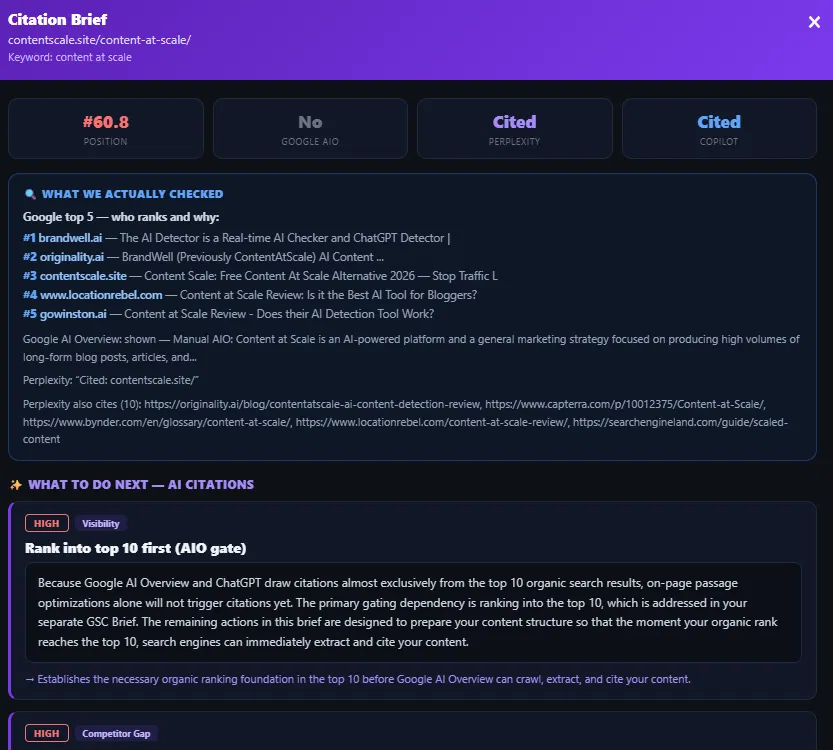
The gap they leave is the independent operator and the small team who want to start now, for free, and get the exact fix rather than a dashboard. That is where the free AI Citations Tracker fits: point it at a URL and it checks whether Google AI Overviews, Perplexity, and Copilot cite you, shows which competitor holds the citation you are missing, and returns a copy-paste brief with the specific change to make — then rescans to confirm the lift. It pairs directly with the GSC report: Google tells you your footprint inside Google, the tracker tells you your footprint everywhere else, and both point at the same page-level fix.
Frequently Asked Questions
How do I see AI search traffic in Google Search Console?
What is the difference between AI Overviews and AI Mode?
Does traditional SEO still matter for AI search visibility?
What is Retrieval-Augmented Generation (RAG) in Google Search?
How can I track my brand’s citation share of voice?
See where you stand in AI search
Search Console shows your footprint inside Google’s AI. The AI Citations Tracker shows it across ChatGPT, Perplexity, Gemini, and Claude too — so you know exactly which pages get cited and which get skipped.

Ottmar J.G. Francisca
Ottmar J.G. Francisca built the ContentScale AI Citations Tracker and created the GRAAF Framework — a 100-point content quality system paired with the free AI Citations Tracker. Working solo from Amsterdam with 24+ years in systems and operations management for the City of Amsterdam, he developed GRAAF after analyzing 200+ traffic declines — building on the Princeton University GEO-bench research — then combined it with Julia McCoy’s CRAFT Framework and the PULSE + NEXUS research system.
✓ 200+ businesses in 47 countries · ✓ 78% traffic recovery within 90 days · ✓ Creator of the GRAAF Framework · ✓ 24+ years in systems & operations management